
BLACKLIQUID
visual programming without a black box
Many visual programming languages solve one problem while creating another. BLACKLIQUID is my attempt to close that gap: a visual programming language that doesn’t just connect logic, but makes processes readable. At its core is a simple idea: data behaves like a flow—and the user should be able to see that flow, including decision points, state changes, and side effects.
This project is a privately initiated research initiative and prototyping lab. It explores how program logic can be represented as visible system dynamics—so beginners can become productive faster, and advanced users can understand a program’s structure more clearly.

BLACKLIQUID is aimed at beginners who want to build their first projects quickly. Instead of struggling through the steep entry barrier of text-based programming, the visual system enables a direct start—with early wins and logic that’s easy to follow.
Problem: why many visual languages are confusing despite being “simple”
Visual programming is often marketed as an “easier entry point”. In practice, typical breaking points appear:
Black-box blocks: The crucial logic sits inside a block and disappears from view.
Invisible dynamics: You can see connections, but not when and why something happens.
Difficult debugging: Errors feel “magical” because states and signals aren’t transparent.
Poor readability as projects grow: Once a project gets larger, the diagram quickly becomes cluttered and hard to follow.
BLACKLIQUID doesn’t aim for “more features”, but tackles a fundamental question of representation: what does a visual language need to look like so you can read programs like systems?
Approach: visual semantics instead of block tinkering
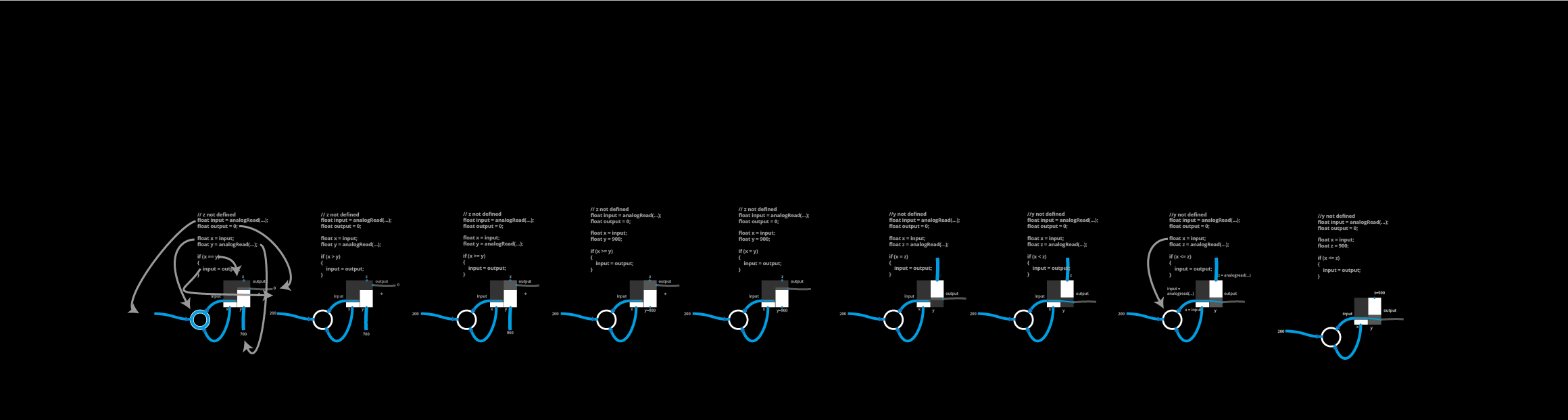
BLACKLIQUID focuses on visual semantics: the shape of an element should already explain what it does—and how it behaves within the system.
Instead of “block + parameters”, the focus is on:
Flows (inputs, transformations, outputs)
Decision points (comparison, threshold, condition)
States and signals (HIGH/LOW, active/inactive, triggers)
Effects (what is actually being driven in the end)
The “liquid” metaphor isn’t decoration—it’s structure:
If data is treated like a fluid, logic becomes an experience of controlling flows, not an abstract line of code.
What the user sees: a canvas that makes logic readable
A BLACKLIQUID program is a visible chain of:
source → processing → decision → action
Key benefits for the user:
You can see at a glance where data comes from and where it goes.
Conditions don’t feel like “if statements”, but like visible switches in the flow.
Outputs aren’t “somewhere in the background”—they appear as concrete actions (e.g., LED on/off, motor, signal).
This makes the interface both a programming environment and an explanatory model.
Systems-theoretical perspective: observability as an architectural principle
BLACKLIQUID is also a systems-theory case study: a program isn’t a static object, but a system of flows, couplings, and feedback loops.
The key lever is observability:
States aren’t guessed—they’re visible.
Signal paths aren’t assumed—they’re traceable.
Errors aren’t “mystical”—they show up as disturbances in the flow.
Debugging becomes system analysis: Where does it back up? Where is it delayed? Where does it branch incorrectly?
Why this is strong from a learning perspective
BLACKLIQUID makes typical programming concepts immediately tangible:
Causality: “If X, then Y” becomes understandable as a visible branch.
Abstraction: Functions aren’t just blocks—they are clearly readable transformations.
Systems thinking: Users don’t only see parts, but relationships and side effects.
The goal isn’t to “replace” code.
The goal is to accelerate understanding—especially in the phase where many learners drop out because they lack a solid mental model.
Project status
BLACKLIQUID is currently in the prototype stage and serves as an experimental sandbox for:
Visual grammar (What does an operation look like without relying on text?)
Interaction principles (How do you build quickly without becoming imprecise?)
Readability at scale (How does a canvas stay scalable as it grows?)
Debug mechanics (How do you clearly show states, triggers, and signal paths?)
Next steps
The next development steps are intentionally focused on making the language “mature” as a system:
Library of core operators (comparison, threshold, filtering, mapping)
Clear type and signal models (e.g., digital/analogue, event/state)
Visual debugging view (live states, path highlighting, history)
Scalability (grouping, modules, reuse without losing readability)
Conclusion
BLACKLIQUID is my response to a core question in visual programming: how do you design interfaces that don’t hide logic, but make it visible?
The goal is a visual language that isn’t just “easy to use”, but genuinely readable—like a system diagram that actually comes to life.
If visual programming is to be truly powerful in education, prototyping, and creative technology, it doesn’t need more blocks. It needs better semantics, better observability, and a representation that supports thinking rather than replacing it.
BLACKLIQUID — example canvas: The graphic shows how BLACKLIQUID visualises data flow and logic: an input value is routed through processing steps and comparison conditions (e.g., ==, >=), which are displayed as visible decision points. On the right, a digital signal (HIGH/LOW) is translated into a concrete action—an LED switches depending on the state. At the bottom, additional comparison operators are shown as building blocks that can be combined into larger workflows.